 PlayFable Arcade
PlayFable Arcade
PlayFable Arcade
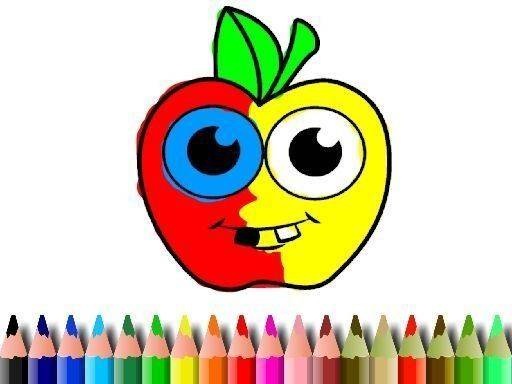
Fruit Canvas Relaxing Color Studio succeeds in its goal of providing a low-stress creative outlet. The simple tap-to-fill mechanics are intuitive, and the lack of timers or scores removes any sense of urgency. The image selection is charming and family-friendly, while the undo feature makes experimentation risk-free. It is an ideal choice for anyone seeking a quiet, meditative activity that encourages artistic expression without demanding skill or speed.
Fruit Canvas Relaxing Color Studio provides a straightforward platform where the primary activity is selecting and applying colors to pre-drawn outlines. There are no complex rules or objectives to follow, which makes the experience accessible to anyone, regardless of age or artistic background. The interface is designed to be immediately understandable, so users can begin their creative session without any tutorial or instruction.
Upon starting, a gallery of images appears, each featuring simple, friendly themes. Players browse this collection and pick one that appeals to them. A palette of colors then becomes available, offering a wide spectrum of choices. The act of coloring is performed by tapping or clicking on the desired color and then touching the area of the picture to be filled. This direct method allows for quick experimentation and easy corrections.
A key aspect of this game is its lack of pressure. There are no timers, scores, or competitive elements. This design encourages users to proceed at their own comfortable speed, focusing on the process rather than any end result. The absence of failure conditions makes it a suitable activity for relaxation, helping to reduce stress and promote a calm mindset.
The content within Fruit Canvas Relaxing Color Studio is curated to be appropriate for all family members. The images avoid any themes that could be considered mature or unsettling, ensuring a safe environment for children and adults alike. This makes it a viable option for shared play, where multiple people can take turns or collaborate on a single piece of artwork.
Once a piece is finished, the game provides a simple way to save the final image to the user's device. This feature allows players to keep a record of their creations, share them with others, or print them for display. The ability to save work adds a sense of accomplishment and provides a tangible outcome from the creative process.








Player Comments
Sign in to comment
You must be logged in before posting a review or rating.
No account? Create one
No comments yet. Be the first to comment!